Troubleshooting a VMware ESXi Virtual Machine Configuration
Access Denied Error
When trying to connect to your ESXi VM using a terminal emulator and entering correct credentials, you may get an Access denied message.
To resolve this issue, perform the following steps:
-
Make sure your terminal emulator settings are configured as described in Connecting to the OpenVMS Console.
-
Press Ctrl + U before entering your password and type in your password again.
OPA0: Session Is Hung
If your OPA0: session appears to be hung, you can perform the following steps to reset the session:
-
In the ESXi Host Client, click on the virtual machine, then click the Edit button on the virtual machine details page.
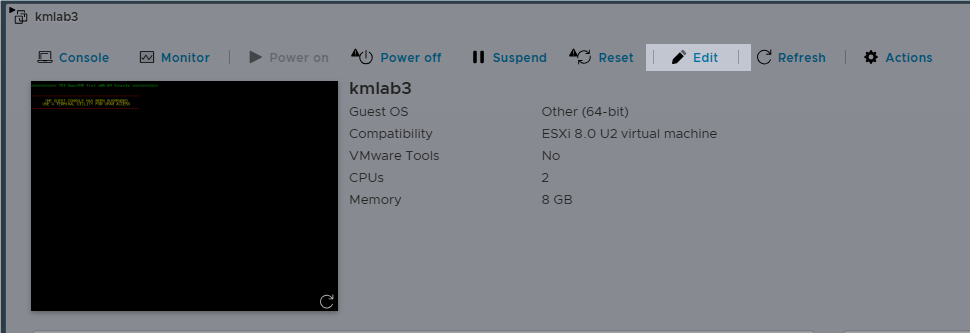
A pop-up window will open.
-
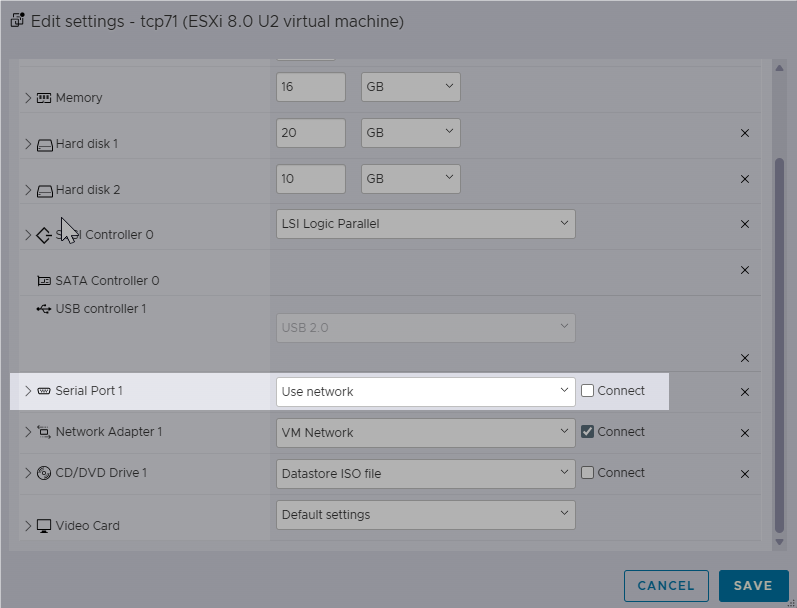
In the Edit Settings window, uncheck the Connect box as shown below:
-
Click Save.
-
Open the Edit Settings window again by clicking Edit. Check the Connect box in the Serial Port section.
-
Click Save. Your OPA0: session has now been reset.
Blocked Network Traffic
If DECnet is installed or LAN Failover is in use, you may find that network traffic is being blocked. This affects all network traffic, including TCP/IP.
By default, DECnet and LAN Failover will change the MAC addresses on their network interfaces to addresses starting with "AA-00-04-00", followed by the encoded DECnet address or the remainder of the MAC address if LAN Failover is in use. By default, most hypervisors block traffic after this MAC address change as a safety measure.
To resolve this issue, you can use one of the following methods:
-
Configure the hypervisor to allow MAC address changes. For instructions on how to do this, refer to the MAC Address Changes section.
-
Configure the virtual machine with the MAC address that corresponds to the DECnet address.
Note
This workaround will not work with LAN Failover enabled as the LAN Failover MAC address is applied to any member of the LAN Failover set.
The method to calculate the MAC address is described in the "Configuring a Cluster Alias" section of the VSI DECnet-Plus for OpenVMS Installation and Configuration Manual.
For instructions on how to change the MAC address on the virtual network interface, refer to Adding Network Adapters to your ESXi VM.
-
Configure DECnet to not change the MAC address on the interface.
If you are running DECnet-Plus and do not need to use addressing compatible with DECnet Phase IV, you can disable Phase IV addressing by editing SYS$MANAGER:NET$ROUTING_STARTUP.NCL.
For example, you would change the following command:
SET NODE 0 ROUTING CIRCUIT SVA-1 ENABLE PHASEIV ADDRESS = TRUEto the command below in order to disable Phase IV addressing on the circuit:
SET NODE 0 ROUTING CIRCUIT SVA-1 ENABLE PHASEIV ADDRESS = FALSE -
Do not run DECnet. If you do not need to use any DECnet protocols, disable DECnet from starting up. Alternatively, choose not to install it when going through the installation procedure or delete it from your system afterwards.